

Events & Tickets
BOX OFFICE HOURS
Wed. & Fri. 10AM-5PM. Open 2 hours prior to events.








How to Use a Promo Code
Step-by-Step: Unlocking Your Ticket Offer
Follow these steps to apply a discount or presale code when purchasing tickets.
1. Click “Buy Tickets” in your offer email.

2. Accept any pop-up information.
Some events display an info box before checkout. Click “Accept & Continue” to proceed.
If multiple showtimes are available, select your preferred date and time.
3. Click “Unlock.”
On desktop/tablet: upper right corner.
On mobile: below the map (list view only).
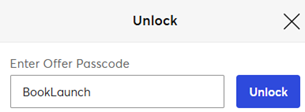
4. Enter your discount code and click “Unlock.”
5. Choose eligible seats.
List view: the offer appears under qualifying seats.
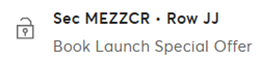
Map view: discounted seats display in darker blue.

6. Proceed to checkout.
The discount automatically applies. No additional promo code is required.
Your cart will display the offer name and adjusted ticket price.
7. Complete your purchase and enjoy the show!